Every privacy tool answers a need, and most people install the tool before asking the question. This workshop does the opposite. By the end, you will have your own threat model, written on one page, telling you which protections are worth your effort, which ones you can ignore and in what order to set them up. Allow about 30 minutes the first time, then 10 minutes when you review it every few months. No technical knowledge is needed.
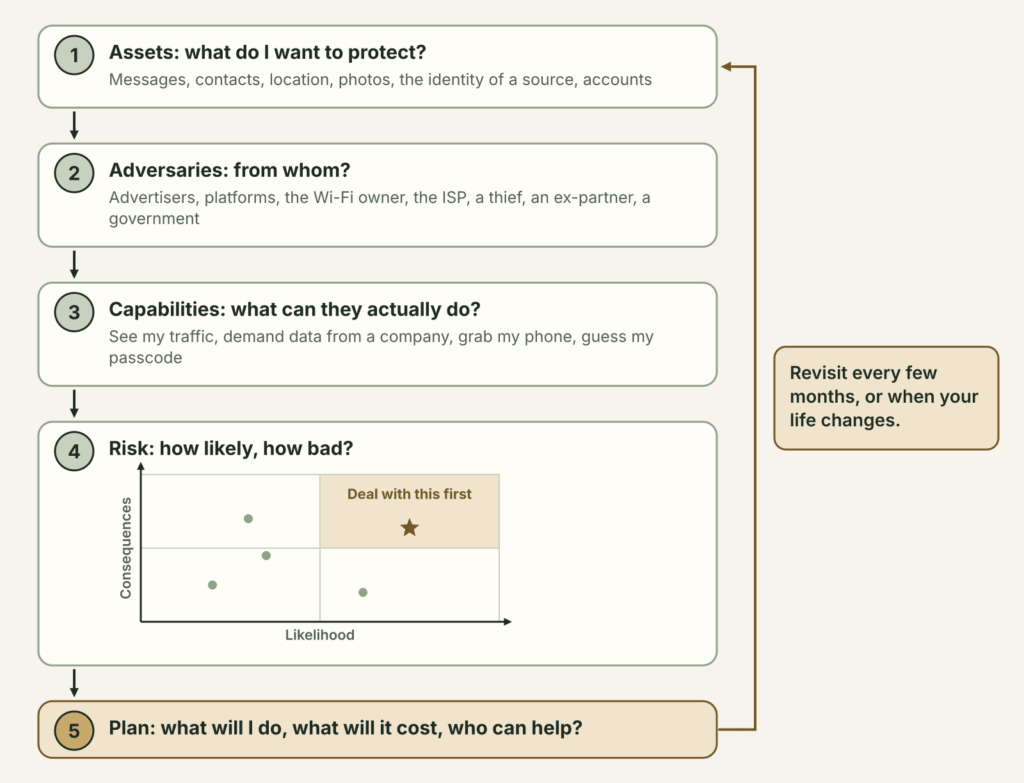
The method is the one security professionals use, boiled down to six questions. What do I want to protect? From whom? What can they actually do? How likely is it, and how bad would it be? What price am I willing to pay to prevent it? Who can help me?
Who this protects, from whom, and why
This guide protects you from the most common mistake in digital security, which is protecting the wrong thing. Someone who spends a weekend hardening their browser while their abusive ex still knows their phone passcode is no safer. A journalist who uses an encrypted app with a source but calls them from the newsroom phone the day before publication has already exposed them. A threat model keeps you from spending your energy where it does not count.
The person you protect may be yourself, but also your sources, your children, the members of a group or a relative whose phone you set up. The people you protect often face a different adversary than yours.
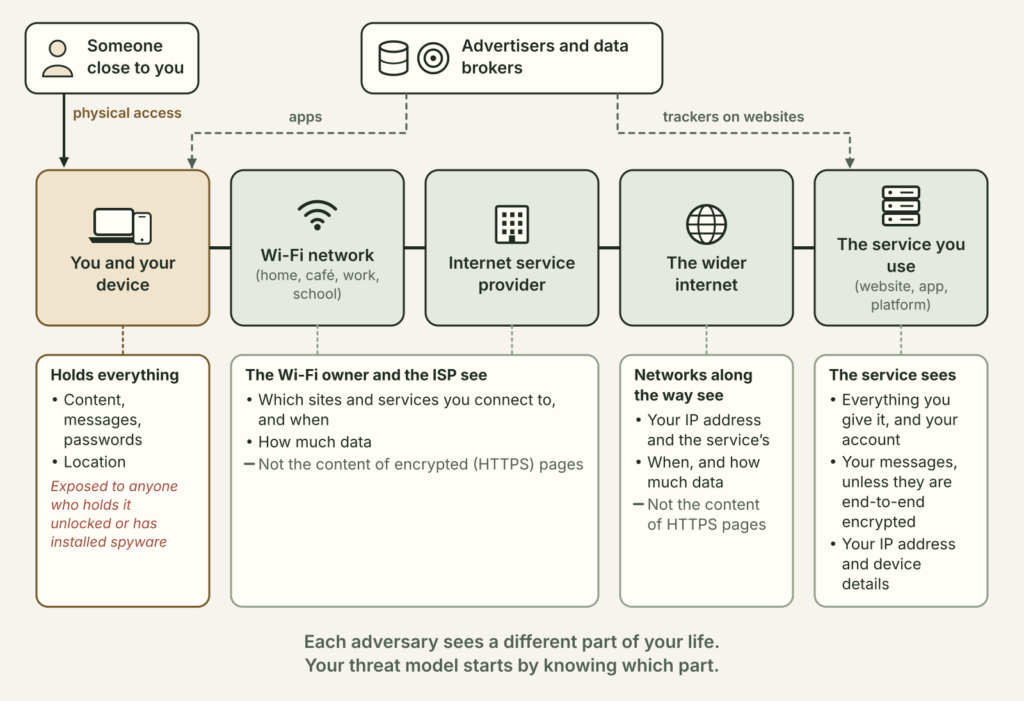
The adversaries you will think about are the realistic ones. For most people, they are advertisers and data brokers who build profiles from apps and websites, the platforms you use every day, the owner of the Wi-Fi network you connect to (a café, a hotel, your employer or your school), your internet service provider, a thief or a stranger who gets hold of your phone, and sometimes someone close to you who has physical access to your devices and knows your habits. For some people, you must add a government that censors the internet, watches its population or can seize devices and demand passwords.
Just as clearly, here is what a threat model does not do. It does not protect you on its own, because it is a plan, and the protection comes from the steps you take afterwards. It cannot shield you from an adversary with unlimited means who targets you personally, such as an intelligence service with a court order and spyware. At that level you need professional help, and this guide tells you where to find it. It does not replace legal advice, or a safety plan made with a specialised support worker if someone is threatening you. Finally, it is only as good as the information you put into it, and a model built on guesses about what an adversary can do should be checked against the other Kallima guides and official documentation.
What you need
- About 30 minutes somewhere nobody is looking over your shoulder.
- Paper and a pen, or a document on a device you trust. If the threat that worries you is a person who has access to your computer or phone, use paper and keep it where they will not look, or do the exercise in your head without writing anything down.
- Your phone and your main computer within reach, to check a few settings along the way.
- If you like, a person you trust. Two people spot more blind spots.
Write five headings on your page, Assets, Adversaries, Capabilities, Risk and Plan. You will fill in one per step.
Step 1. List what you want to protect
In security, these are called your assets. In digital life, they are mostly information, sometimes devices and sometimes people.
- Write down the information that would harm you or someone else if it fell into the wrong hands. Think in categories rather than files, for example your messages, your contacts, your location or your movements, your photos, your browsing history, your health or banking data, your accounts (email, social networks, bank), and anything you hold for others, such as the identity of a source or the names of a group’s members.
- Next to each item, write down where it lives. On your phone, your laptop, an online backup, an email provider, a messaging app, a shared family computer, on paper. The same information is often in four or five places.
- Add the assets that are not information. Your simple ability to communicate can be one if you live where the internet is cut off during protests. Your physical safety is one if someone can use your location to find you. Your reputation and your job can be part of it too.
- Circle the three most important items. You will come back to them at every step.
You should now have a list that surprises you a little. Most people discover that their email account matters more than they thought, since it is the key that resets every other password, and that their location history is stored in more places than they knew.
Step 2. Name your adversaries
An adversary is any person or organisation that might want your assets or might get them by accident. Naming them precisely is the most important part of the exercise, because each one has different powers.
- For each circled asset, ask yourself who would want it. Be concrete. Not “hackers”, but “a stranger who steals my bag”, “the ad networks whose trackers are built into the apps I use”, “my employer, who runs the network at work”, “my ex, who still has my phone passcode”, “the police of the country I am travelling to”.
- Add the people who are not hostile but careless. A relative who posts photos of your children with their location, a colleague who forwards your emails, a friend whose phone is full of your messages and has no screen lock.
- Add the companies that hold your data, even if they mean you no harm. A company can be hacked, sold or forced by a court to hand over what it keeps.
- Write the adversaries next to the assets they are after. One adversary can want several, and one asset can attract several.
Step 3. Assess what they can actually do
A capability is what an adversary is able to do, not what you fear they will do. Assessing it well spares you both panic and underestimation.
- For each adversary, write down which part of the path between you and the rest of the world they control. Refer to the “who sees what” diagram above. The Wi-Fi owner and your internet provider see which services you connect to, when and how much, but on HTTPS pages they do not see the content. The service you connect to sees everything you give it. A person holding your unlocked phone sees everything on it.
- Ask yourself what legal or social power they have. A government can order a company on its territory to hand over data, block websites and sometimes force you to unlock a device at a border or during an arrest. An employer can monitor the devices it owns and the networks it runs. An ex may know your answers to security questions, your passwords or the name of your first pet.
- Ask yourself what means and skills they have. A data broker has industrial capacity but no interest in you in particular. A jealous partner has few technical skills but enormous motivation and physical proximity, and commercial spyware (stalkerware) is cheap. A well-funded state can buy sophisticated spyware, but it keeps it for a small number of targets.
- Write down what they cannot do. Your internet provider cannot read your Signal messages. A website you visit with a VPN does not see your real IP address. A thief who takes a phone that is turned off and encrypted cannot easily read it. These limits are what your protections will rely on.
Step 4. Weigh likelihood and consequences
Risk combines two ideas that are often confused. Likelihood is the chance that a given adversary actually goes after a given asset. Consequences are how bad things would be if they succeeded. An adversary can be very capable and still unlikely to take an interest in you, and a threat can be likely but harmless.
- For each adversary and asset pair, rate the likelihood as low, medium or high. Base it on facts. Has it already happened to you or to people like you? Do they have a reason to target you personally, or are you one row among millions in a database?
- Rate the consequences as annoying, serious or severe. Annoying is targeted ads following you everywhere. Serious is an emptied bank account or a leaked intimate photo. Severe is a source losing their job or their freedom, or an abuser finding your new address.
- Draw the small two-axis chart from the worksheet diagram and place each pair on it. Everything in the top right corner (likely and severe) is your priority. What is likely but annoying deserves simple, cheap fixes. What is severe but unlikely deserves a backup plan rather than daily effort.
- Pay special attention to consequences that fall on other people. Your address book exposes your friends. Your messages expose the people you talk to. If you protect other people, their risk counts in your model, even if yours is low.
Step 5. Decide the price you are willing to pay
Every protection has a cost, whether money, time, convenience, and sometimes friendships or visibility. A protection dropped after a week protects nobody, so cost is part of the model.
- For each priority from step 4, write down two or three possible protections.
- Next to each protection, write down its cost honestly. A strong phone passcode costs a few seconds each time you unlock. Moving a group chat to a new app costs the time it takes to convince everyone.
- Choose the protections that remove the most risk for a cost you can sustain. Start with the cheapest ones that address your top right corner. Two habits kept for years are worth more than ten tools installed once.
- Write down what you decide not to do, and why. This is part of the plan. It will also make it easier to see later whether your situation has changed and the decision no longer holds.
Step 6. Write the plan and find your allies
- Under Plan, list the protections you chose, in order, each with the threat it answers. For example “Set a passcode of at least six digits on my phone, because of theft and my ex” or “Use a VPN for my online searches”.
- List who can help you. Your allies may be a friend who is comfortable with technology, your organisation’s IT department if it is on your side, a lawyer, a domestic violence support worker, a digital security helpline for journalists and activists. Also list who needs to change their habits for the plan to work, for example the other members of a group chat.
- Write down what you will do if something goes wrong, if your phone is stolen, if an account is hacked, if you are arrested, if the internet is cut off.
- Put a date in your calendar, three to six months from now, to review the page. Review it sooner if you move, change jobs, start or end a relationship, start a sensitive project or travel to a country with different laws.
Check that it works
A threat model is only useful if it changes what you do. These tests show you whether yours does.
- The stolen phone drill. Imagine your phone is stolen tonight while it is unlocked, then while it is locked. List what the thief can read, which accounts they can reset through your email or text messages, and how you would erase the phone remotely. Check that remote erase really works for you today, with the Find My app on iPhone or Google’s Find Hub on Android, and that you can still sign in to your email without the phone (backup codes, a second device).
- In the adversary’s shoes. Spend ten minutes as your main adversary. Search for your name and your phone number. Look at what your public profiles show. If your adversary is someone close to you, go through your phone the way they would. Which apps open without a passcode? Which notifications show their content on the lock screen? Which accounts list, in their security settings, devices you do not recognise?
- The cost review. A month after making your plan, look at which protections you still use. The ones you dropped were too costly, so replace them with less demanding solutions rather than pretending.
- The “what if” test. Reread your plan for the worst scenario (arrest, internet shutdown, hacked account, someone finding you). If the first three things you would do are not written down, write them now.
Limits and common mistakes
- Protecting yourself from the movie villain instead of the real one. Many people fear state hackers when the realistic threat is a partner who knows their passcode, or a phone left unlocked on a café table. Start with the likely threats.
- Confusing capability with likelihood. That a government can do something does not mean it is doing it to you. The opposite mistake is just as dangerous, because “nobody is interested in me” stops being true the day you hold someone else’s secret.
- Forgetting metadata. Encryption hides what you say, not always who you talk to, when, from where and how often. For a source or an activist, metadata is often enough.
- Forgetting the other end. Your messages are also on your contacts’ phones. Disappearing messages and screen locks only help if everyone in the conversation uses them.
- Believing a tool is a plan. A VPN, an encrypted messaging app or Tor Browser solves one specific problem. None of them protects an unlocked phone, a reused password or a careless contact.
- Changing everything at once in a dangerous situation. When the adversary watches you closely, a sudden change can itself act as a warning. Plan your changes gradually, according to your situation.
- Never coming back to it. Your threats change with your life, and tools and laws change too. A two-year-old model is probably wrong somewhere.
The limit of this whole method is that it is only as accurate as what you know. If your situation involves a powerful adversary who targets you personally, ask experts for help rather than relying on this page.
Going further
- Your Security Plan, in the Electronic Frontier Foundation’s Surveillance Self-Defense, the reference version of the questions used in this guide.
- Apple’s Personal Safety User Guide and Android’s help page on unknown trackers.
- The Coalition Against Stalkerware, for people who suspect spyware on their phone.
- SecureDrop, from the Freedom of the Press Foundation, for sources and newsrooms.
- Access Now’s Digital Security Helpline, free and reachable around the clock for journalists, activists and human rights defenders.
- Find A Helpline, a free directory of helplines in more than 175 countries, including support for domestic violence.